We get asked this more often than you would think. Can you really run a proper silent disco party using Spotify alone? The short answer is yes. When it’s set up properly, it works brilliantly.
You seldom need a full DJ booth, decks, or a stack of speakers. A phone, tablet, or laptop running Spotify can keep you entertained for the whole night. The trick is not the tech. It’s how you prep your playlists, how you connect your kit, and how you handle the room once people start moving.
At The Silent Disco Company, we have seen everything from living room parties to packed-out venues run this way. Same principle every time. Keep it simple, keep it steady, and let the music do the heavy lifting.
What You Will Need for a Smooth Silent Disco Setup
Before anything else, get your basics sorted. This is where most people either set themselves up for a smooth night or a frustrating one.
Here’s what we recommend:
A Spotify Premium account (no ads cutting through the mood)
A device to run Spotify, ideally fully charged and plugged in
A transmitter to broadcast your music
Synced headphones, ready to go
Playlists built ahead of time
That last one matters more than people expect. A strong playlist carries the night. A weak one… well, you will feel it quickly.
Step-by-Step: How to DJ a Silent Disco Party Using Spotify
There’s no shortage of music streaming apps out there. Spotify, Apple Music, Google Play, SoundCloud, YouTube Music, Tidal, Deezer. Take your pick.
They all give you access to huge music libraries, along with ready-made playlists that work well for a silent disco party. You can stream over WiFi or mobile data, or download tracks in advance if you would rather not rely on a signal at night. So, without further ado, here’s how you can start right away:
Step 1: Select Your Music Streaming App for a Silent Disco
Start with a streaming app you trust. Spotify is the go-to for most Silent Disco setups. It’s stable, easy to use, and provides access to a rich library without much effort. You do not want to be hunting for tracks mid-party. Pick your platform, get familiar with it, and stick with it.
There are plenty of options out there. Apple Music, SoundCloud, YouTube Music, Tidal, and Deezer. All solid in their own way. Still, Spotify tends to be the easiest to run on the night, especially when you are juggling playlists and keeping the flow going.
One thing worth flagging. The free version comes with ads, and they will cut in at the worst possible moment. That’s not something you want when the room’s in full swing.
Upgrade to Premium, and you will receive uninterrupted playback, plus the option to download playlists. That last bit matters more than people think. If your venue has a patchy signal or no WiFi, you have already covered yourself.
Step 2: Create Your Silent Disco Playlist
This is where the night is really built. Think about flow. You would not open at full volume or wind things down with filler. Build it in stages.
We usually break it down like this:
Early evening warm-up
Mid-set energy builders
Peak-time favourites
Late-night wind-down
A well-planned silent disco party playlist gives you control without needing to hover over every track.
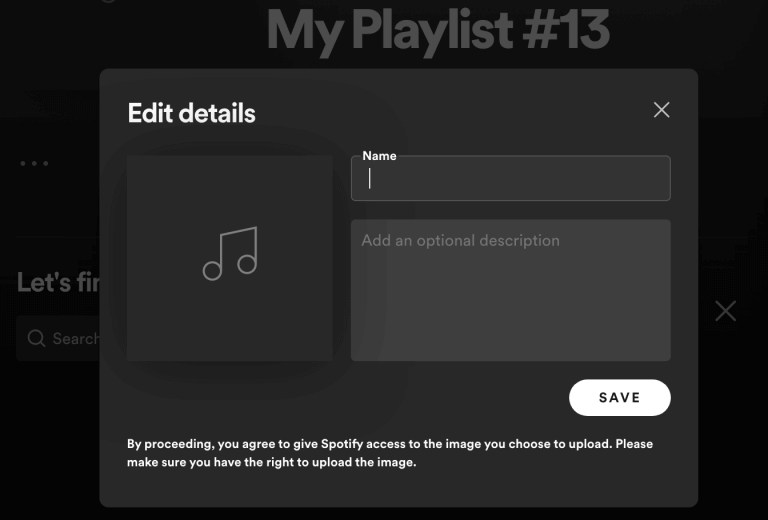
You can keep costs down by creating your own playlists rather than hiring a DJ. Spotify makes it easy. Create a new playlist; search by artist, genre, or even terms like ‘2000s R&B’ or ’90s dance’ and start stacking tracks. It also gives you flexibility at night. Got a request? Add it in seconds.
That said, too many choices can slow you down. It’s easy to end up with a playlist that feels scattered or runs out too soon. We have seen both happen, and neither helps the mood.
If you would rather skip the guesswork, our ready-made Spotify playlists are built for Silent Disco Hire events. Just search ‘The Silent Disco Company’, and you will find sets that hold the room from start to finish.
Step 3: Use Spotify DJ Mode
Spotify’s DJ-style features are there to keep things ticking over smoothly. You will not get full mixing control, but for a silent disco party, you rarely need it.
Head into settings and switch on options, such as Autoplay, Playback, and Automix. Once they are active, Spotify starts doing the heavy lifting. Tracks blend into each other, crossfades kick in, and the gaps disappear.
You can even tweak how long each transition lasts. Keep it tight for energy, or stretch it out if the mood calls for it. Think of it as a steady hand in the background, keeping the flow intact while you focus on the crowd.
Step 4: Use Spotify Play Queue
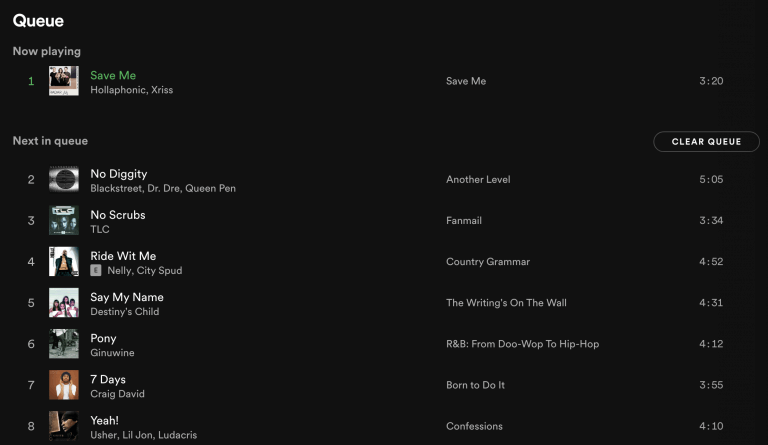
The play queue is where you stay in control. Line up tracks in advance. Adjust based on how the crowd reacts. Skip, shuffle, or swap things out without breaking the flow. It sounds simple, and it is. Once the room fills up, that control becomes everything.
Running a silent disco this way keeps things flexible. Found a track you want to drop in? Hit “Add to Queue”, and it slots straight into your playlist. Easy.
You can also reorder tracks on the fly. Drag them up or down, bring a request forward, or hold one back for later. Quick moves, no fuss, and the music never loses momentum.
Step 5: Plug-in, Play, and Party with Silent Disco Headphones
After all the prep, this is the easy part. Connect your devices to the transmitters, sync the silent disco headphones, and press play. If you are running multiple channels, plug in up to three music sources, and you are set. Then it clicks.
Music starts, colours light up, and people find their groove. Some head straight for the dancefloor. Others flick between channels, testing what’s playing. Give it a few minutes, and it builds. Different playlists, different moods, all in the same space.
Choosing the Right Silent Disco Setup
Getting the music right is one side of it. The kit you use is the other one.
Hire 3-Channel Silent Disco Headphones
Three channels change everything. Different tastes, one space. You will see it straight away. One group belting out classics, another deep into house or R&B, and a few switching between both depending on the mood.
That’s where Silent Disco Headphones come into their own. Our LED sets run up to three channels through a simple plug-and-play transmitter. Connect your devices, assign your playlists, and you’re off.
The range stretches far enough to cover large spaces, and switching between channels takes a second. No queues or arguments over music. One playlist for the 80s, one for the 90s, and one for current hits. Everyone finds their lane, and the dancefloor stays busy.
Hire a Silent Disco Company Fully Loaded Tablet
If you would rather skip the setup and get straight to the good part, a preloaded tablet is a smart move. Planning a silent disco party takes time. Sorting playlists, finding a reliable device, and making sure everything actually works on the night. It adds up.
That’s why we offer fully loaded tablets, ready to go out of the box. Each one comes packed with thousands of tracks, so you don’t have to worry about what plays next or whether the music will run out halfway through.
No digging out old devices or dealing with patchy performance. Just plug in, press play, and let the night take over.
Reading the Room (And Why It Matters More Than the Playlist)
Here’s the part people seldom expect. Even with great playlists, the crowd still decides the night.
You might think your peak set is perfect. Then suddenly, a throwback track gets the biggest reaction. That’s your cue.
Stay flexible. Skip tracks if needed. Switch channels. Lean into what people respond to. A great DJ reads the room. Even with Spotify, that instinct still matters.
Why Silent Disco Hire Makes Spotify DJing Work
You can have the best playlists in the world, but if the sound cuts out or the signal drops, it shows. That’s why Silent Disco Hire plays such a big role in how the night feels.
Clear audio. Reliable connection. Headphones that stay synced. It all adds up.
We have seen it first-hand. When the setup works, people forget about the tech and enjoy the music. That’s the point.
Silent Disco Hire with The Silent Disco Company
Planning to run your own set using Spotify? We have built our setups to make that straightforward. We test everything before it leaves us. We keep the setup simple. No complicated instructions, no guesswork.
Whether it’s a small party or a larger event, the idea stays the same. Give you the tools, keep it easy, and let you focus on the night. Take a look at what we offer at The Silent Disco Company and get everything sorted ahead of time. It saves you thinking about it later.
Frequently Asked Questions
Yes, you can. We have seen plenty of events run entirely on Spotify. With the right playlists and setup, it works smoothly from start to finish.
No, you do not. A phone, tablet, or laptop is enough. As long as it connects to the transmitter, you are good to go.
Three channels are the sweet spot. It gives people a choice without overcomplicating things. That’s why most of our setups are built around it.
Very. They are designed for quick setup and simple controls. Guests can switch channels and adjust volume without needing any explanation.
We provide fully tested equipment, simple setup guidance, and support when needed. Everything arrives ready to go. So, you can focus on the music and the crowd.